A crypto wallet can be perfectly convenient and still be a poor place to store your long-term savings. The opposite is also true: a highly secure storage setup may become frustrating if you need to approve transactions several times a day.
This is the practical difference between hot and cold wallets. One prioritises quick access. The other is designed to keep private keys away from internet-connected devices.
Neither option is automatically safe or unsafe. What matters is how the wallet works, how you protect its recovery phrase and what you use it for.
What Makes a Wallet Hot or Cold?
The distinction comes down to the way private keys are stored and used.
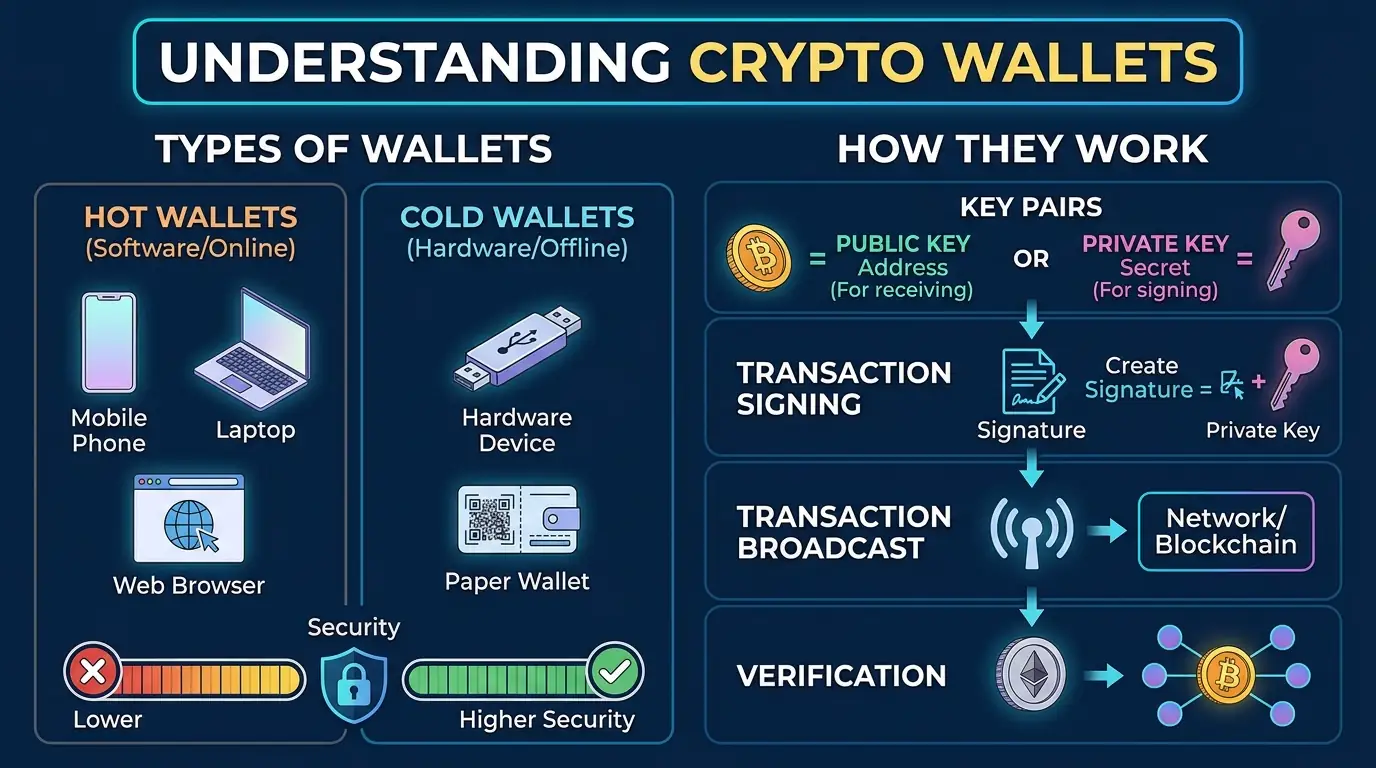
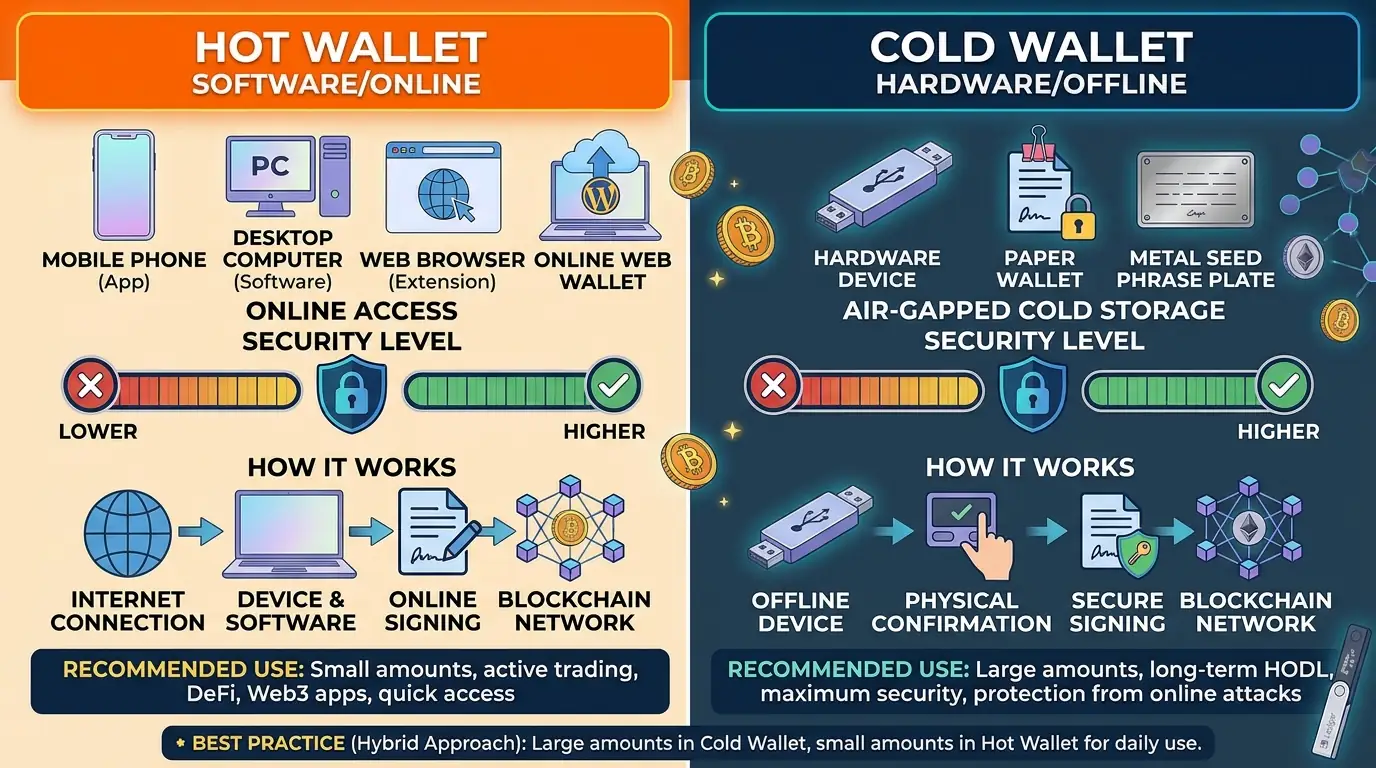
A hot wallet keeps its private keys on a device or service connected to the internet. This includes mobile apps, desktop applications, browser extensions and many online wallets.
A cold wallet keeps private keys offline. The keys are generated and stored in an environment that does not expose them to an internet-connected device. Hardware wallets are the most familiar example.
Think of the difference as carrying cash in your everyday wallet versus keeping savings in a secure place at home. The first is easier to access. The second is less exposed to the risks associated with carrying money around.
The comparison is not about where your cryptocurrency physically sits. Your coins and tokens remain recorded on their respective blockchains. The wallet manages the keys that allow you to control them.
Hot Wallets: Convenience Comes With Exposure
Hot wallets are designed for regular use. They make it easier to send funds, connect to decentralised applications, exchange tokens or check balances without handling a separate physical device.
There are several common types.
Mobile wallets
These are applications installed on a smartphone. They are useful for everyday payments and for interacting with crypto services while away from a computer.
Their main weakness is that the phone is an internet-connected device. Malicious applications, compromised operating systems, phishing links or a stolen unlocked phone can put wallet access at risk.
A screen lock and biometric authentication help, but they do not protect against every attack.
Desktop wallets
Desktop wallets run on a computer. Depending on the software, they may offer advanced transaction controls, portfolio management or support for different networks.
The main concern is the security of the computer itself. Malware designed to monitor activity, replace copied addresses or steal wallet data can create serious problems.
A computer used for gaming, downloading files and browsing unknown websites has a different risk profile from one kept updated and used mainly for financial activity.
Browser extensions
Browser wallets allow users to connect directly to decentralised applications. This makes them practical for DeFi platforms, NFT marketplaces and other services that operate through websites.
However, the browser is also where many phishing attacks begin. A fake website can imitate a legitimate application and ask users to connect their wallets or approve a transaction.
Connecting a wallet does not automatically give a website permission to take funds. The danger often comes later, when the user signs a malicious transaction or grants an excessive token allowance.
Web wallets and exchange accounts
Some services allow users to access their crypto through a browser account. An exchange account is a common example.
However, there is an important distinction: if the provider controls the private keys, the account is custodial. The user relies on the company to manage access and process withdrawals.
A service can be online without giving the user direct control of the keys. This is why hot versus cold and custodial versus non-custodial are two separate classifications.
Cold Wallets: Keeping Private Keys Offline
Cold storage aims to reduce the possibility of an online attacker reaching the keys needed to authorise transactions.
Hardware wallets
A hardware wallet is a dedicated physical device designed to generate, store and use private keys without exposing them to an internet-connected computer or phone.
When a user wants to send cryptocurrency, the connected wallet application prepares the transaction. The hardware device receives the information, displays the relevant details and signs the transaction internally.
The private key does not need to leave the device.
The signed transaction is then returned to the connected application, which broadcasts it to the blockchain network. The hardware wallet does not need to hold the cryptocurrency itself or remain permanently connected to the internet.
One important security feature is the device’s own screen. It gives the user an independent way to check the destination address and amount before approving a transaction. This matters because malware could replace an address copied on a computer without changing what the user sees in the application.
Air-gapped devices
An air-gapped wallet uses a device that remains physically disconnected from networks such as Wi-Fi, Bluetooth and the internet.
Transactions can be transferred using QR codes, removable media or other offline methods. The device signs the transaction without connecting to the network, and another device broadcasts the signed result.
This approach can reduce exposure, but it also introduces more steps. Users must manage the transfer process correctly and make sure the information being signed is genuine.
Paper backups
Paper is sometimes described as a cold wallet, but this can be misleading.
A printed recovery phrase or private key is usually a backup, not a complete wallet with the functionality needed to create and sign transactions. It can help restore access to a wallet, but anyone who obtains the information may also gain control of the funds.
Paper can be damaged by water, fire, fading ink or simple mistakes when copying words. Some users choose more durable physical backup materials, but these still need to be stored securely.
How Does an Offline Wallet Send a Transaction?
Keeping private keys offline does not prevent a wallet from interacting with a blockchain. It changes where the signing takes place.
Consider a user who wants to send Bitcoin from a hardware wallet.
- The online application prepares an unsigned transaction with the destination address and amount.
- The transaction is sent to the hardware wallet.
- The device displays the transaction details for the user to check.
- The user approves it on the device.
- The hardware wallet signs the transaction internally.
- The signed transaction returns to the online application.
- The application broadcasts it to the Bitcoin network.
The network receives the signed transaction, not the private key.
This separation is the central idea behind cold storage: an internet-connected computer can prepare and transmit a transaction without having direct access to the secret needed to authorise it.
Bitcoin’s developer documentation describes both offline wallets and hardware wallets as signing-only systems. The same general principle is used by hardware wallets for other blockchain networks, although the transaction formats and approval processes differ.
Hot Wallet vs Cold Wallet: The Main Differences
| Feature | Hot wallet | Cold wallet |
|---|---|---|
| Private key environment | Internet-connected device or service | Offline or isolated device |
| Everyday access | Usually faster | Requires an additional step |
| Online attack exposure | Higher | Reduced, not eliminated |
| Typical use | Frequent transactions | Long-term storage |
| Transaction approval | App, computer or service | Offline signing device or process |
| Main risks | Malware, phishing and compromised devices | Physical loss, backup exposure and signing mistakes |
| Recovery | Depends on provider or recovery phrase | Usually depends on a securely stored backup |
Cold storage reduces certain online risks, but it does not eliminate human error. A user can still approve a malicious transaction, expose a recovery phrase or lose the only backup.
Likewise, a hot wallet is not automatically unsafe. A well-maintained device, reputable software and careful transaction habits can make a hot wallet suitable for holding a limited amount of cryptocurrency.
Custodial vs Non-Custodial: A Different Question
It is easy to confuse these two distinctions.
Hot and cold describe how private keys are stored and used. Custodial and non-custodial describe who controls those keys.
For example:
- A mobile wallet can be non-custodial if the user controls the private keys.
- An exchange account is generally custodial because the company controls the keys.
- A hardware wallet is normally used for non-custodial storage, although the wider service connected to it may introduce additional dependencies.
A non-custodial wallet gives the user more direct control, but also more responsibility. If the recovery phrase is lost and there is no other valid backup, there may be no company capable of restoring access.
The Risks You Still Need to Consider
Cold storage is a useful security measure, but the device itself is only one part of the system.
Phishing and fake applications. Attackers may imitate wallet software, support teams or hardware-wallet websites. Download applications from official sources and never enter a recovery phrase into an unfamiliar website.
Malicious transaction approvals. A wallet can be asked to sign something other than a simple payment. Some smart contracts request permission to spend tokens. An excessive or malicious approval can put assets at risk.
Compromised recovery phrases. A hardware wallet cannot protect a recovery phrase that has been photographed, uploaded to cloud storage or entered into a fake recovery page.
Counterfeit or manipulated devices. A device obtained from an untrusted seller may have been altered or supplied with a recovery phrase that someone else already knows.
Physical damage or loss. A hardware wallet can break, be stolen or become inaccessible. A separate, properly stored backup is essential.
Firmware and software vulnerabilities. Dedicated devices reduce the attack surface, but they are still electronic products. Firmware, companion applications and transaction integrations can contain vulnerabilities.
The key point is that a cold wallet protects the private-key environment. It cannot decide whether a transaction is sensible or whether the person operating it is being deceived.
How to Choose the Right Setup
The best choice depends on how often you use crypto and how much responsibility you are prepared to manage.
If you make frequent transactions: A reputable non-custodial mobile or browser wallet may be practical. Keep only the amount you expect to use regularly and protect the device with a strong passcode.
If you mainly hold cryptocurrency: A hardware wallet is generally more appropriate for keeping private keys offline. Make sure you understand its backup and recovery process before transferring significant funds.
If you use DeFi regularly: A separate hot wallet for applications can help isolate your long-term holdings. Do not connect the wallet containing your main savings to every new platform you want to test.
If you manage substantial holdings: More advanced arrangements, such as multisignature wallets or geographically separated backups, may be worth considering. These systems are more complex and should be tested carefully before being used to store significant funds.
A practical arrangement for many users is to combine both types: a hot wallet for day-to-day activity and a cold wallet for funds that do not need frequent access.
A Short Security Checklist Before Using a Hardware Wallet
Before transferring funds to a cold wallet, take a few precautions:
- Buy the device from the manufacturer’s official store or an authorised seller.
- Initialise it yourself and follow the manufacturer’s verification process.
- Never use a recovery phrase supplied by a seller or included on a pre-filled card.
- Write down the recovery phrase accurately and store it offline in a secure place.
- Never share the phrase with support staff, websites or other people.
- Verify the destination address and amount on the hardware wallet’s own screen.
- Send a small test transaction before moving a larger balance.
- Check that you understand how to restore the wallet before relying on it.
The last point is particularly important. A backup is only useful if it works. Understanding the recovery process before an emergency is much safer than discovering a problem when a device has already been lost.
The Practical Answer
Hot wallets are designed for access. Cold wallets are designed to reduce the exposure of private keys to online threats.
You do not necessarily have to choose one and abandon the other. Keeping a small amount in a hot wallet while storing longer-term holdings in cold storage can provide a reasonable balance between convenience and security.
The important decision is not simply which wallet looks safer. It is whether your setup matches the way you use cryptocurrency—and whether you can recover access if something goes wrong.
Sources
- Bitcoin.org – Frequently Asked Questions: Hot and Cold Wallets
- Bitcoin.org – Securing Your Wallet
- Bitcoin Developer Guide – Wallets
- Bitcoin Core – Offline Signing Tutorial
- Ethereum.org – Security and Scam Prevention
- Trezor – What Is a Hardware Wallet?
- BitBox Support – What Makes a Hardware Wallet Secure?